
Read · Recognize meaning
Pick the English word from Chinese, the Chinese from English, or the image from English — plus pattern cloze. Definitions, examples, and context build deep semantic understanding.
A trainer that understands your forgetting curve — master reading, listening, speaking, and spelling
Keetch is an English vocabulary trainer built on the FSRS-5 memory model. New words are first introduced and spelled with you; once you've got them, FSRS-5 takes over — bringing each word back right at the moment you're about to forget it. The interface is available in Simplified Chinese, Traditional Chinese, English, Japanese, and Korean. Definitions follow the selected language, and you can switch the interface to English on its own.
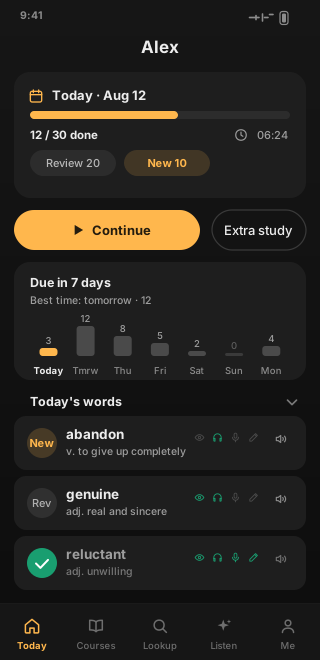
No clutter, no red dots. Every screen does one thing: helps you remember the words you need today.
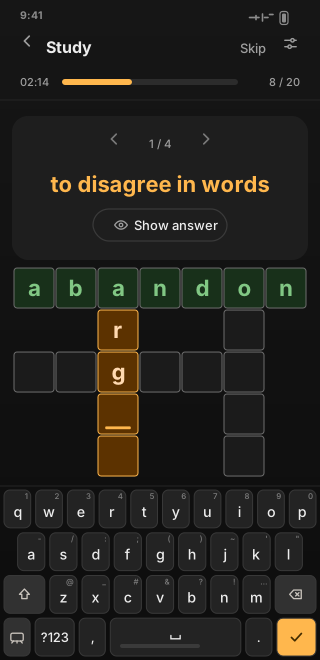
A training system built around four skills: not just recognizing words, but hearing, saying, and writing them.
Pick the English word from Chinese, the Chinese from English, or the image from English — plus pattern cloze. Definitions, examples, and context build deep semantic understanding.
Choose the English word, the Chinese meaning, or the image from audio, with continuous Ear Train playback. Switch between normal and slow speed and practice on your commute.
Read-aloud scoring word by word. British and American IPA are generated automatically; heteronyms such as read and record take the pronunciation that matches the sense, and you choose the accent.
Spell from Chinese, from audio, or from an image — plus crosswords, word chains, and sentence building. Move from passive recognition all the way to active production.
Each of the four skills is scheduled independently: master one and you can mark it as mastered to leave its queue; get rusty and you can restart just that skill — the other three keep going and are never reset together.
Every dimension has dedicated exercise types, and each can be turned off — you shouldn't have to grind through types you don't want.
We don't just throw words at you and walk away. We teach the word first, then let the FSRS-5 memory model take over.
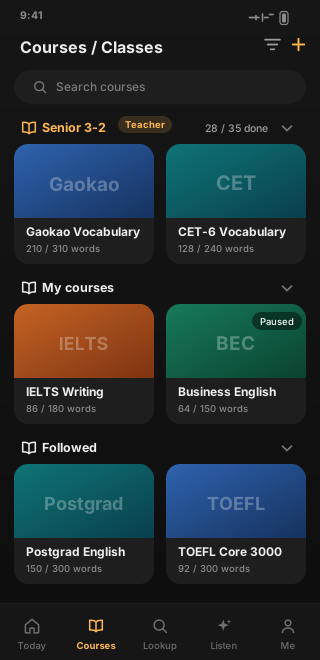
Pick from the built-in library, bulk import a CSV, or just take a photo — one snapshot of a word list becomes a course.
New words don't ask you to spell them right away. They deepen step by step — recognize, distinguish, produce — each step landing just within reach.
Once a word takes shape, FSRS-5 takes over: it estimates memory stability from every answer and schedules the review for the moment you're about to forget. The steadier your answers, the longer the next interval.
What you need to learn isn't always in someone else's word list. Keetch treats course building and teaching as first-class citizens.
Add entries one by one, import a whole table, or just take a photo — the barrier to building a course is low enough to do on a whim.
Teachers create a class; students join with a class code. Assignments, supervision, and review all happen on the class page.
Browse public courses on the Discover page, or join precisely with a K + 8-character share code; find a teacher's courses by U + numeric ID.
Follow someone else's course and learn along. Your progress is saved separately; pause or leave anytime without affecting the course.
Public sharing requires teacher verification, and course content passes a sensitive-word check. Report from any page — the course and entry you're viewing are attached automatically.
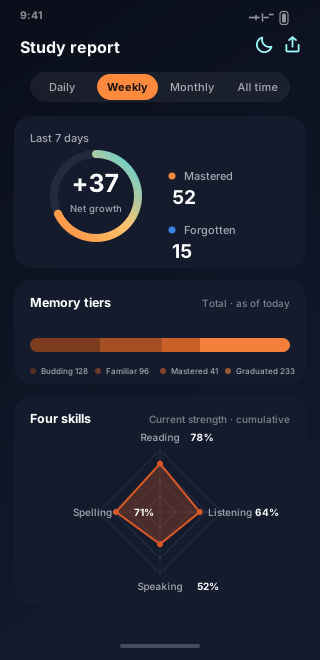
Daily, weekly, monthly, and all-time reports lay out every gain and every lapse.
Reading, listening, speaking, and spelling each draw an edge; the memory-strength radar shows strengths and weak spots at a glance, and weak spots get priority reminders.
Net growth for the period, newly mastered and forgotten words, consecutive study days, and a day-by-day curve — the real trajectory of memory, not a feeling.
Export a deep-space-style long image in one tap — record your growth and keep going with friends.
Keetch syncs across platforms so you can pick up your learning anywhere.
On Android, install from Google Play or download the APK directly. On iOS, use the App Store; on HarmonyOS, use Huawei AppGallery. Desktop builds cover Windows, macOS, and Linux. On Linux, make the AppImage executable after downloading; if FUSE is missing (the default on Ubuntu 22.04 and later), use the tar.gz and run the executable from the extracted folder.